> ## Documentation Index
> Fetch the complete documentation index at: https://perplayerkit.com/llms.txt
> Use this file to discover all available pages before exploring further.
# Public kits
> Server-wide preset kits that any player can load with /publickit. How to add one in config.yml and save what goes inside it.
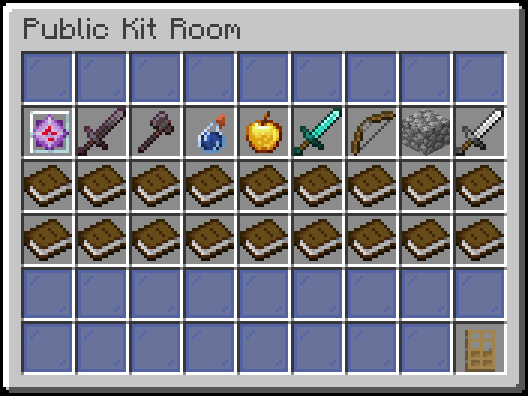 ## What ships by default
Nine kits are declared in `config.yml`: `crystal`, `mace`, `netherite`, `pot`, `uhc`, `sword`, `axe`, `ffa` and `cart`. They are declared, not filled.
A declared kit with no contents shows in the menu with a red **\[UNASSIGNED]** tag. Fill them all at once:
```bash theme={null}
/perplayerkit autosetup
```
A kit whose `icon` material does not exist on the server is skipped entirely rather than shown empty. The `mace` kit is hidden when the server API has no `MACE` material.
On an existing install, `/perplayerkit autosetup add-kits` adds missing starter definitions and fills unsaved content. Custom entries are preserved.
The menu uses pages when more than 27 kits are declared.
## Add a public kit
```yaml config.yml theme={null}
publickits:
crystal:
name: Crystal
icon: END_CRYSTAL
gapple:
name: Gapple Fight
icon: ENCHANTED_GOLDEN_APPLE
```
The key (`gapple`) is the kit **id**. Commands take the id, not the display name: `/savepublickit gapple`, never `"Gapple Fight"`.
Contents cannot be saved until the kit exists in the config.
Armor slots and off-hand included. The kit is a snapshot.
```bash theme={null}
/savepublickit gapple
```
Requires `perplayerkit.admin`. In `/publickit`, an admin can also **shift-click** a kit to open its editor.
Run `/publickit` and load the kit.
### The two config fields
| Key | Type | |
| ---------------------- | ------ | ---------------------------------------------------------------------------------------------------------------------------------------------------------------------------------------------------------------------------- |
| `publickits..name` | string | Menu label. Accepts [MiniMessage](/settings/formatting) tags, such as `"Gapple Fight"` |
| `publickits..icon` | string | Menu icon. An uppercase [Bukkit material](https://hub.spigotmc.org/javadocs/bukkit/org/bukkit/Material.html) name |
## Load a public kit
```bash theme={null}
/publickit
```
`/pk` and `/premadekit` open the same menu. Clicking a kit replaces the player's inventory. An unassigned kit cannot load. Rekit-on-kill references to missing contents log a warning and fall back to the remembered kit.
## Restrict who can use them
`perplayerkit.publickit` controls access; `perplayerkit.use` includes it. To hide public kits from a group without touching its other kit permissions:
```bash theme={null}
/lp group default permission set perplayerkit.publickit false
```
## What else uses public kits
| | |
| ---------------------------------- | ---------------------------------------------------------------- |
| [Automatic rekit](/features/rekit) | Selects a public kit by world or region after respawns and kills |
| [The Java API](/api) | Loads a public kit for a player from your own plugin |
## Copy public kits to another server
```bash theme={null}
/kitdata export publickits my-publickits
```
The export holds every public kit **and its config entry**; [importing](/data/export-import) adds the missing entries to the other server's `config.yml`.
## World and region rules
Use `locations.public-kits` to choose where this feature works. This controls manual browsing and loading. Automatic rekit has separate feature rules.
See [Worlds and regions](/settings/locations) for configuration and troubleshooting.
## What ships by default
Nine kits are declared in `config.yml`: `crystal`, `mace`, `netherite`, `pot`, `uhc`, `sword`, `axe`, `ffa` and `cart`. They are declared, not filled.
A declared kit with no contents shows in the menu with a red **\[UNASSIGNED]** tag. Fill them all at once:
```bash theme={null}
/perplayerkit autosetup
```
A kit whose `icon` material does not exist on the server is skipped entirely rather than shown empty. The `mace` kit is hidden when the server API has no `MACE` material.
On an existing install, `/perplayerkit autosetup add-kits` adds missing starter definitions and fills unsaved content. Custom entries are preserved.
The menu uses pages when more than 27 kits are declared.
## Add a public kit
```yaml config.yml theme={null}
publickits:
crystal:
name: Crystal
icon: END_CRYSTAL
gapple:
name: Gapple Fight
icon: ENCHANTED_GOLDEN_APPLE
```
The key (`gapple`) is the kit **id**. Commands take the id, not the display name: `/savepublickit gapple`, never `"Gapple Fight"`.
Contents cannot be saved until the kit exists in the config.
Armor slots and off-hand included. The kit is a snapshot.
```bash theme={null}
/savepublickit gapple
```
Requires `perplayerkit.admin`. In `/publickit`, an admin can also **shift-click** a kit to open its editor.
Run `/publickit` and load the kit.
### The two config fields
| Key | Type | |
| ---------------------- | ------ | ---------------------------------------------------------------------------------------------------------------------------------------------------------------------------------------------------------------------------- |
| `publickits..name` | string | Menu label. Accepts [MiniMessage](/settings/formatting) tags, such as `"Gapple Fight"` |
| `publickits..icon` | string | Menu icon. An uppercase [Bukkit material](https://hub.spigotmc.org/javadocs/bukkit/org/bukkit/Material.html) name |
## Load a public kit
```bash theme={null}
/publickit
```
`/pk` and `/premadekit` open the same menu. Clicking a kit replaces the player's inventory. An unassigned kit cannot load. Rekit-on-kill references to missing contents log a warning and fall back to the remembered kit.
## Restrict who can use them
`perplayerkit.publickit` controls access; `perplayerkit.use` includes it. To hide public kits from a group without touching its other kit permissions:
```bash theme={null}
/lp group default permission set perplayerkit.publickit false
```
## What else uses public kits
| | |
| ---------------------------------- | ---------------------------------------------------------------- |
| [Automatic rekit](/features/rekit) | Selects a public kit by world or region after respawns and kills |
| [The Java API](/api) | Loads a public kit for a player from your own plugin |
## Copy public kits to another server
```bash theme={null}
/kitdata export publickits my-publickits
```
The export holds every public kit **and its config entry**; [importing](/data/export-import) adds the missing entries to the other server's `config.yml`.
## World and region rules
Use `locations.public-kits` to choose where this feature works. This controls manual browsing and loading. Automatic rekit has separate feature rules.
See [Worlds and regions](/settings/locations) for configuration and troubleshooting.